You're trying to get one more AI workflow to work, and it isn't. Your team already uses a few AI tools. This time you asked for something simple, like an onboarding plan for the account executive starting on Monday. It came back fluent, well formatted and generic.
It could belong to any company in your market. And generic output doesn't get used: the team tries the workflow twice and goes back to doing it by hand.
So your team rewrites every draft. They paste the same context into the chat every morning. RevOps teams, for example, end up re-explaining the same accounts to their AI every day.
That rework adds up. In a BetterUp Labs and Stanford study published in HBR, 40% of US desk workers had received low-quality AI output in the past month, and each case took about two hours to fix.
The model is doing its job. What it lacks is what your best people know: how you actually onboard, sell, price and decide.
No context gives you generic output. Bad context, like an old process doc nobody archived, gives you wrong output.
Both have the same fix: a knowledge base for AI agents, built from what your experts know and kept current by the people who own it.
You don't have to rebuild everything to get there. From our experience, teams that try to clean up the whole knowledge base at once don't know where to start, and the old docs turn into one continuous pile. The teams that get usable output fix one job at a time.
Key takeaways
- Pick a job your AI gets wrong and start there, not with the whole knowledge base.
- Trace bad answers back to the docs behind them, then fix or archive those docs.
- Only canonical docs need an owner and a verified date.
- The fastest way to capture what isn't written down is to interview your experts with one prompt.
- Run the job again, then move to the next one.
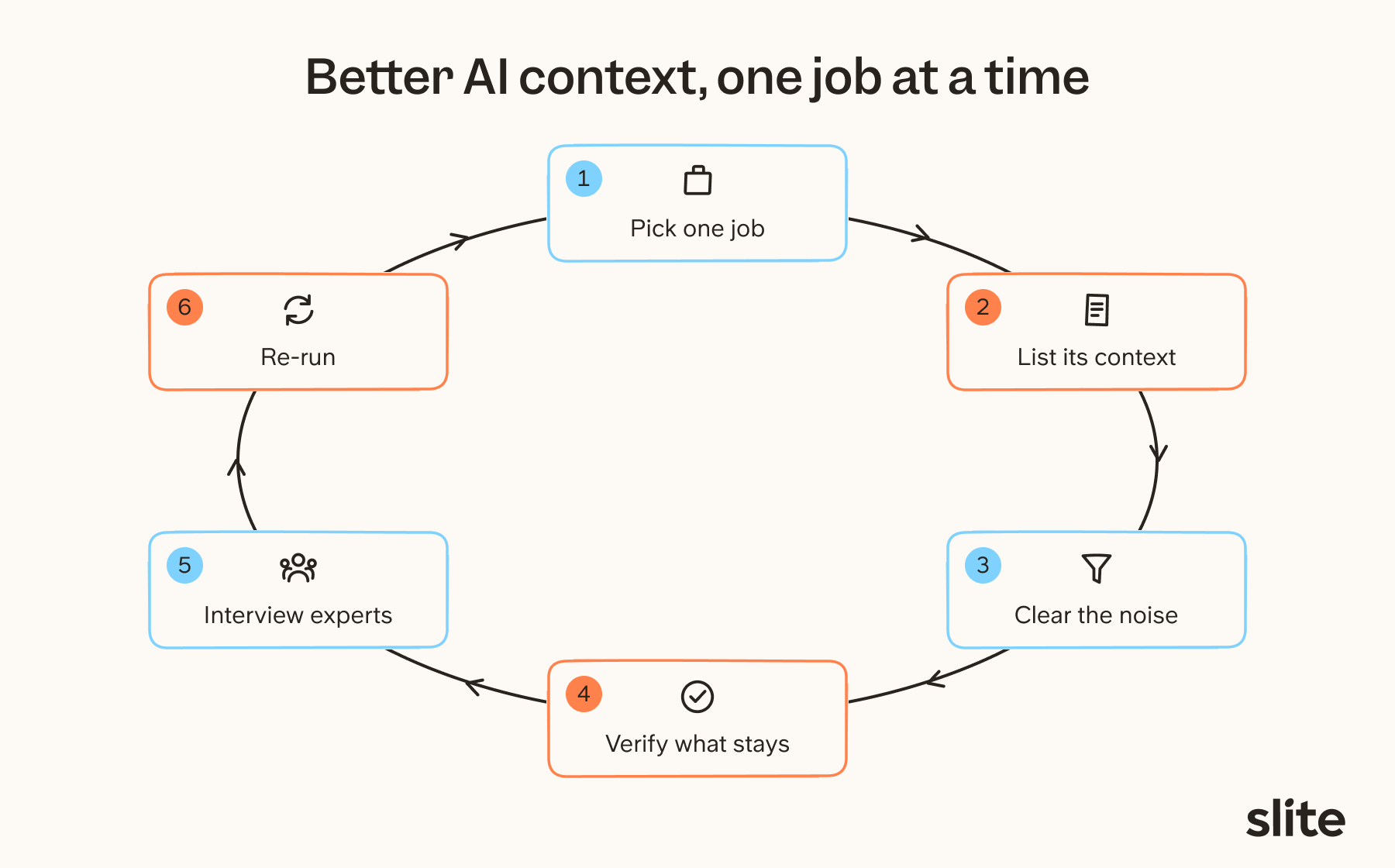
Pick a job your AI gets wrong
A knowledge base for AI agents is the set of company-specific docs, data and know-how an AI tool reads before it answers. Building all of it at once rarely works. Pick a repeated job where the output is clearly off, fix the context for that job, and expand from there.
Each job you fix is one slice of your company brain, so you never have to map the whole thing upfront.
Take the onboarding plan. Your AI drafts a 30/60/90-day plan for a new account executive. It lists a CRM you retired last year, territories from before the reorg, and a sales process that changed in the spring. The sales manager reads it, sighs, and rewrites it from their own notes.
That's a good first job.
Good first jobs share four traits:
- the job repeats,
- a small team does it,
- the bad output is easy to spot,
- and someone (here, the sales manager) can judge what "good" looks like.
Keep the first group to three or four people who do that job. Gorgias, the customer service platform, built its company brain the same way: one department at a time, starting with finance, as their Staff Context Engineer Yochan Khoi explained in our Company brain: build vs buy webinar.
A small scope gives you a clean before and after.
List the context that job needs, and what's missing
Write down everything a new hire in their first week would need to do the job well: documents, policies, data, past examples, and the knowledge that only lives in someone's head.
Your AI needs at least as much context and instruction as that newcomer, and unlike them, it can't ask anyone.
Then mark each item as missing, wrong, or there but buried. The pattern tells you whether you have a gap, a noise problem, or both.
For the onboarding plan, the list might look like this:
| Context the job needs | Where it lives today | State |
|---|---|---|
| Role description and quota | HR folder, last year's version | Wrong |
| 30/60/90 plan | The manager's personal doc | Buried |
| Tools and access list | IT request templates | Buried |
| Sales process stages | Wiki page written before the spring change | Wrong |
| Territory rules | A Slack thread with the VP of Sales | Buried |
| Who to shadow, and when | Nowhere | Missing |
| How a first call really runs | The top AE's head | Missing |
Each state has a different fix:
- Missing: capture it from the expert who holds it.
- Wrong: fix the doc or archive it.
- Buried: narrow what the AI reads so the right source wins.
The "missing" rows usually matter most. Teams building AI agents commonly find that the real process lives in Slack threads, in tribal knowledge and in "just ask Sarah", not in the official docs.
Sales onboarding is a classic case. The documented sales process might say A, B, C, but in reality a new rep first has several calls with their manager before they reach out to anyone. Nobody writes that down, so no AI tool can know it. And when two people describe the same process differently, that's a sign the process itself isn't settled yet.
The AI context audit template at the end of this guide turns this list into a table you can fill in with your team in 30 minutes.
Clear the noise behind the bad answers
Don't try to review every doc in your knowledge base. Start from the docs behind the failing job: ask the AI to do the job, check which documents it used for the parts it got wrong, and fix or archive those. Then treat inactive, empty or expired documents in the same area as a shortlist to review, rather than a list to delete.
You decide what to archive from the answers that fail, instead of from a spreadsheet of every doc you own.
Trace bad answers to their source
A wrong answer almost always points to a specific doc: an old version, a duplicate, or a draft someone forgot about. Often the right source is in the knowledge base too, but the old doc was never archived, so it's still there creating noise.
Support teams rolling out AI agents run into the same pattern: the model works fine, but it confidently serves up 18-month-old docs about features that have since been reworked.
For the onboarding plan, the old CRM probably comes from an outdated tools page, and the old territories from a planning doc nobody closed. Fix the first, archive the second.
What usually creates noise
| Where | What usually creates noise |
|---|---|
| Docs | Duplicates, abandoned drafts, last year's strategy |
| Slack | Decisions that were reversed later in another thread |
| Sales and GTM | Retired pricing, old battle cards, superseded playbooks |
| Support | Workarounds for bugs that are already fixed |
| Data | Test tables, two definitions of the same metric |
| HR and people | Old handbook versions, last year's onboarding plan |
Meeting notes are history, so keep them
Meeting notes, retros and finished project docs are true for their time. Keep them, because they answer "where is this at?" questions. Just don't let them stand in for the current policy.
Give the AI fewer, better sources
For data, point it at purpose-built views with clear table descriptions instead of the whole warehouse, so it doesn't have to guess which joins to make.
For company knowledge, give all your AI tools one place to read from.
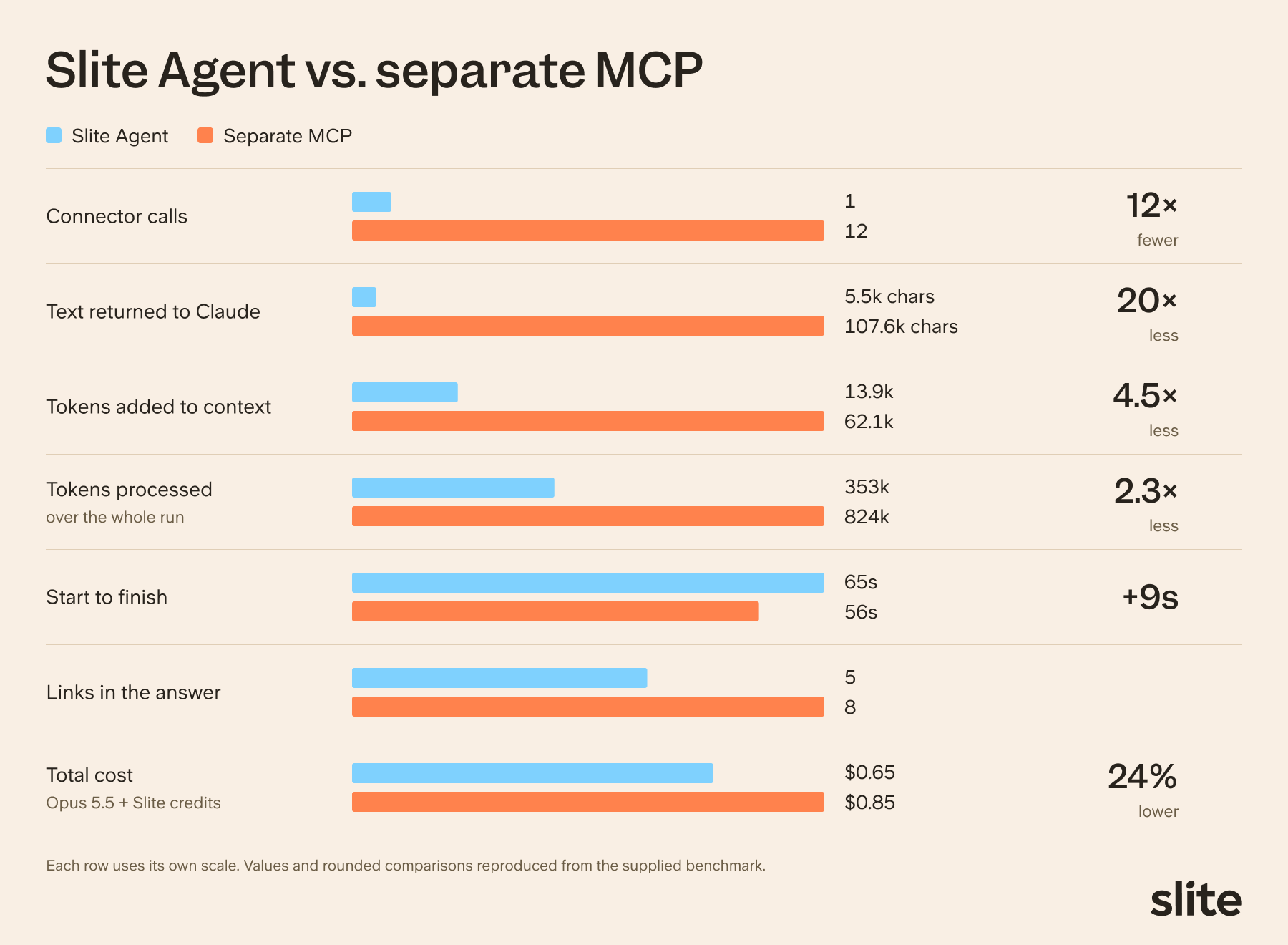
Connecting each app to your AI through its own MCP works well for actions, like creating a ticket, but it's a poor way to pull context: the AI fires call after call, fills its context window with raw fragments and often times out.
We build Slite, a knowledge base made for both people and AI, and this is how we set it up: point Claude, ChatGPT, Cursor or any other AI tool at Slite Agent through Slite's MCP, and make it the single source of truth they ask for company context.
Slite Agent searches your connected tools, favors verified docs and hands back one answer with sources.
The comparison we did recently shows how connecting one source instead of many MCPs compares in practice:
Our guide to giving Claude Code a company brain walks through the setup.
Clearing noise in Slite
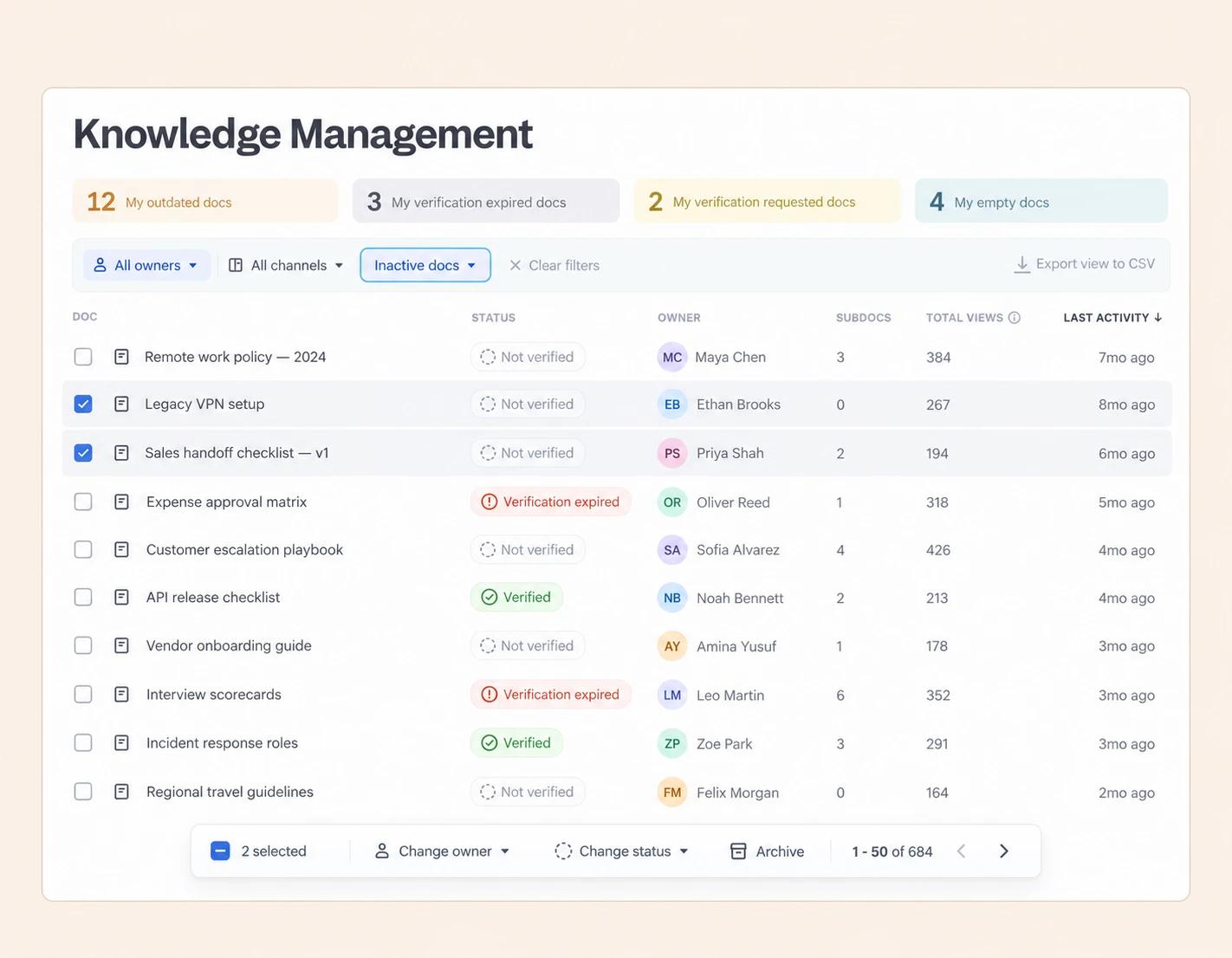
There are several features of Slite that our customers can use to help them clear out some of the noise fast:
- Knowledge Management panel: filter docs by verification status, owner and channel, and find empty, inactive or public docs. Bulk-update verification, change owners or archive from the same view.
- Archive: archived docs are left out of Ask and Search by default, and you can restore them from the Archive at any time.
- External sources: choose which Slack channels and Drive folders sync. Both follow the original tool's permissions.
- BigQuery: pick which tables sync, and use pre-joined views with table descriptions.
For a fuller cleanup routine, see our guide to knowledge base maintenance.
Put an owner and a verified date on what stays
Give every canonical document (policies, processes, pricing, definitions) one owner and a verification date, so people and AI agents can tell what's current. Most other knowledge kept in transient documentation, like meeting notes and brainstorms, doesn't need that treatment.
Verification is how you tell your team members and AI which documents to trust.
For the onboarding job, that means the sales process, the territory rules and the tools list each get an owner who confirms they're right. The brainstorm from last quarter's sales kickoff doesn't.
Chris Pasquier, Slite's CEO and founder, has a simple rule for where to draw the line:
"Anything canonical is worth being verified and I'd aim for 100%. Most of other knowledge does not deserve a badge."
The end state is a small set of docs that need to be right, for people and AI agents alike, with maintenance keeping them fresh against their sources.
In Slite, every doc can have an owner and a verified status. Verified docs rank higher in Ask, Slite Agent and Search, while outdated docs are deprioritized in Ask and left out by Slite Agent.
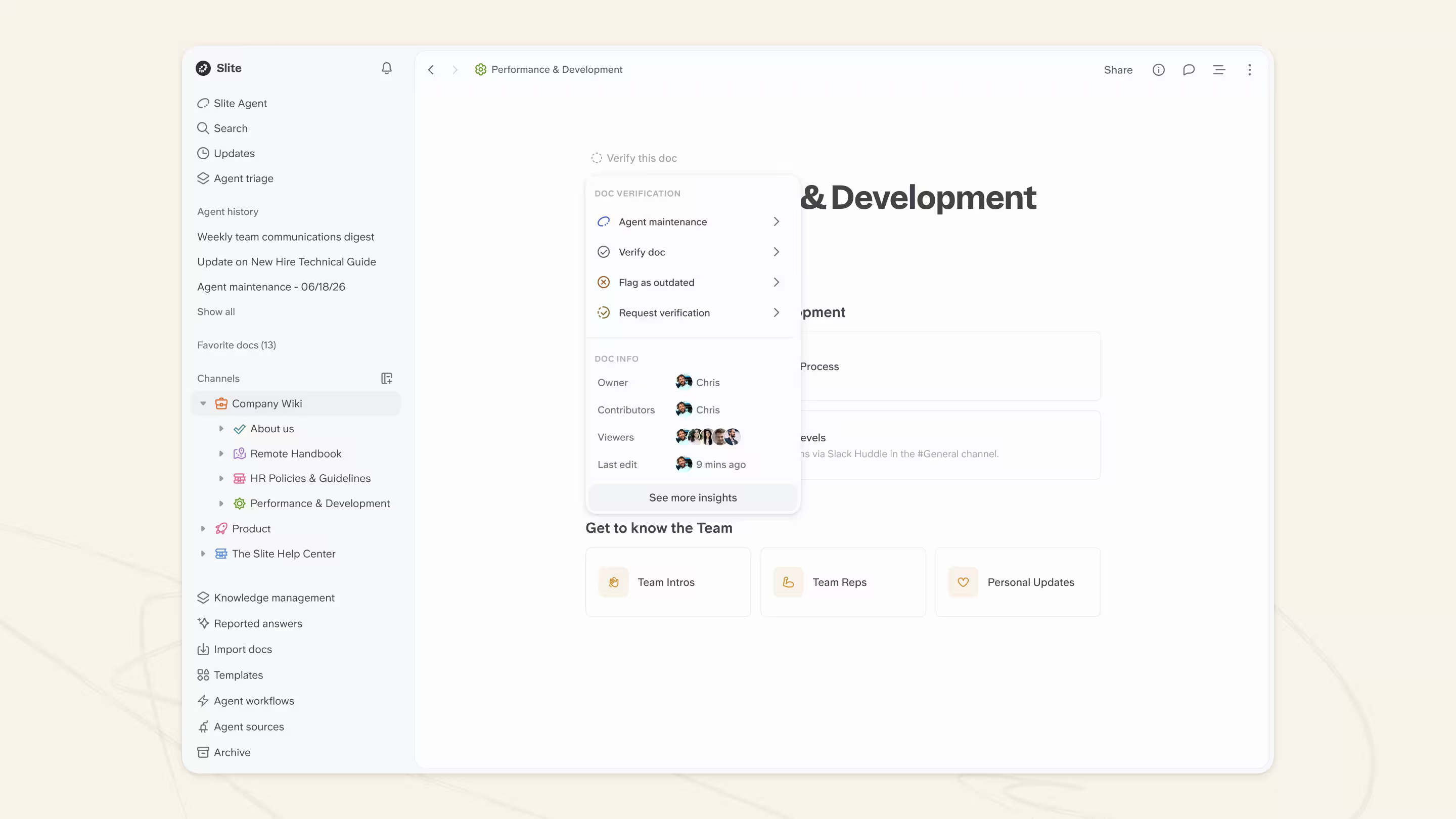
That signal travels beyond Slite, too. Through Slite's MCP server and API, outside AI tools such as Claude or ChatGPT can read each doc's owner and verification status before they use it.
Slite Agent also fact-checks docs, suggests fixes and can propose new docs. Every change goes to the doc owner for review, and nothing is applied automatically.
Our self-maintaining knowledge base guide covers how to keep those docs current over time.
Capture what isn't written down by interviewing your experts
Ask each expert one question that helps extract the most of their knowledge needed for the right AI context:
"Write down everything you'd tell someone joining the company whom you're not allowed to talk to for a week."
This one prompt gets people unstuck, because it gives them a reader to write for.
Not being able to talk to this new “team member” is what really opens people up to write down even the most minuscule details because of the lack of the security net of "they can just ask me".
That way the expert writes down the steps, the exceptions and the reasons they'd normally explain in person.
For the onboarding job, ask your top AE.
Let them answer in writing or out loud by recording them with a dictation tool like Wispr Flow. Most people say more when they dictate than when they type.
Then follow up on every "usually" and "it depends", turn the answers into a draft doc, and have the expert review it before anyone relies on it.
Follow-up questions to ask a subject matter expert
The first answer is a draft. The follow-ups are where the useful detail comes out:
- "Walk me through the last time you did this." A real example instead of a general description.
- "What does it depend on?" Every "it depends" hides a rule.
- "When do you break the rule?" That's where the exceptions are.
- "What does a new person usually get wrong?" This surfaces the traps your AI keeps falling into.
- "Why do we do it this way?" The reason helps the AI handle cases nobody listed.
- "What did I not ask?" The experts cannot tell you what you didn’t ask, so towards the end they might remember more elements that weren’t covered by the draft.
Question quality decides what you get. A NASA knowledge capture working group found that "if the right question is not asked," experts can't share their most critical knowledge, and that simply recording interviews with departing staff was not enough.
Why it works
The prompt comes from Yochan Khoi, who built the internal company brain at Gorgias. In the webinar, he described sitting down with one department at a time and asking people to write down what a newcomer would need. Describing the result, he said:
"…they would be able to onboard on your department just with what you wrote on the paper. And that helped."
He was also clear about the order of the work. The first base had to be built by hand, with people in the room. Only once that structure existed could an agent take over the job of keeping it up to date. Getting colleagues to rely on it still took ongoing education.
Research points the same way. In a 2026 study presented at ECKM, guided interviews that fed a fixed document structure produced more complete, better-structured docs than experts writing on their own.
Review what comes back
Turn the answers into a draft, then send it back to the expert. Look for what's missing as much as for what's wrong. In a study of AI-generated clinical notes in npj Digital Medicine, omissions (3.45%) outnumbered made-up facts (1.47%). An AI draft is more likely to drop an exception than to invent one.
The expert's review is also when the doc gets its owner and its first verified date.
Other ways to capture knowledge
- Record and transcribe. In Slite, Zoom meeting transcripts can feed Slite Agent directly.
- Connect your meeting tools. Granola, Miro and Monday.com connect to Slite Agent through MCP connectors.
- Draft, then approve. A transcript doesn't become a doc on its own. Ask Slite Agent to draft one from it, and the draft lands in Triage for the owner to approve.
- Mine Slack threads. The answer is often already in a thread. Turn it into a doc and give it an owner.
- Capture before people leave. An exit interview with a knowledge handover catches what would otherwise walk out the door. The exit interview template below gives you the questions.
Run the job again, then pick the next one
Re-run the same job and compare the result with the first output. If something is still off, the gap tells you which context is missing. Then move on to the next job. Each one fills in another part of your company brain.
You're done when the job works. The knowledge base will never be complete, and it doesn't need to be.
Here's what one round can change in the onboarding plan:
| Section | First draft | After one round |
|---|---|---|
| Tools | Lists the CRM you retired last year | Current stack, with who grants access |
| Territories | Regions from before the reorg | Current territory rules from the verified doc |
| Sales process | A generic five-stage funnel | Your stages, including the manager calls before first outreach |
| Shadowing | "Shadow senior reps" | Named sessions with the top AE in weeks one and two |
| Who to ask | Blank | The owner of each relevant doc |
Use real questions to decide what to fix next.
In Slite, Ask Insights shows the questions people asked that got a bad answer or no answer at all. That tells you which docs to fix next, and once you've fixed them, you can ask the same question again to check the answer.
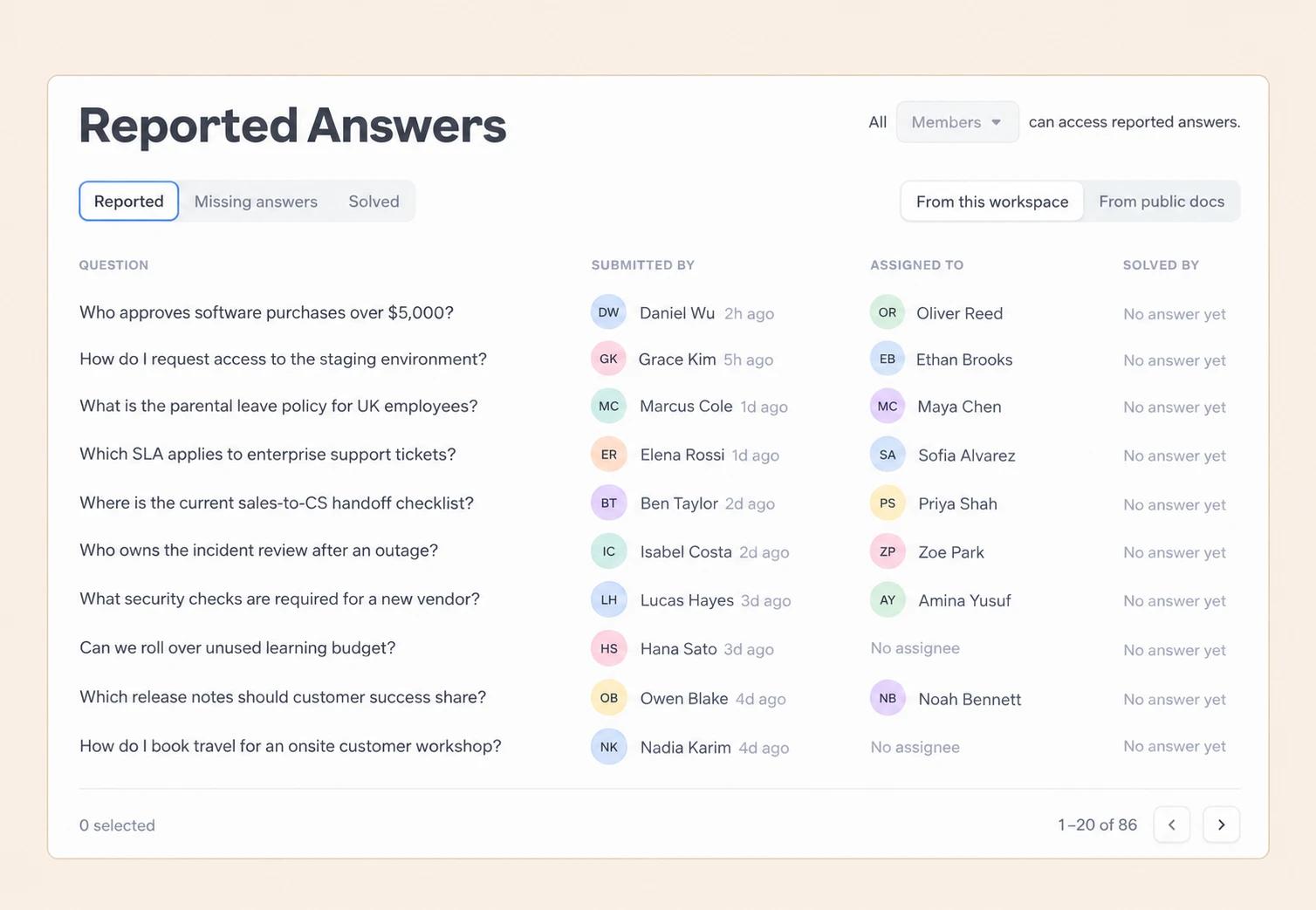
Then pick the next job with the same four traits. After onboarding, that might be account handover notes or the weekly pipeline summary. Over time, these slices add up to a company brain your AI can actually use.
Templates to create your knowledge base for AI agents you can copy
Copy these into your knowledge base and adapt the wording.
AI context audit template
Job: (e.g. draft a 30/60/90-day onboarding plan for a new AE)
Who does it today:
Who judges the output:
What good looks like: (two or three sentences)
| Context needed | Where it lives | Missing, wrong or buried | Owner | Fix |
|---|---|---|---|---|
| Territory rules | Slack thread, VP of Sales | Buried | VP of Sales | Write a canonical doc, verify it |
| Sales process stages | Old wiki page | Wrong | Sales ops lead | Update, archive the old version |
| How a first call runs | Top AE's head | Missing | Top AE | Expert interview |
Get the free AI context audit template in Slite.
Knowledge transfer template (expert interview)
Expert:
Job this covers:
Format: written, or a recorded 30 to 45 minute call
Opening prompt: "Write down everything you'd tell someone joining the company whom you're not allowed to talk to for a week."
| Follow-up question | Doc section it fills |
|---|---|
| Walk me through the last time you did this. | Process steps |
| What does it depend on? | Rules |
| When do you break the rule? | Exceptions |
| Why do we do it this way? | Why |
| Who decides when it's unclear? | Owner and escalation |
| What do people ask you about this most often? | Common questions |
| What does a new person usually get wrong? | Common mistakes |
| What did I not ask? | Anything else |
After the interview: draft the doc, send it to the expert for review, then set the owner and the verification date.
You can also copy the knowledge transfer template straight into your Slite workspace.
Exit interview template
Run one exit interview that covers both the person's feedback and the knowledge handover. The first part helps you keep the next person. The second part keeps the work going, and its output is docs with new owners.
Part 1, exit feedback: why are you leaving, what did you enjoy, what would have made you stay, how did your manager support you, what should we change for the next person, and would you recommend working here?
Part 2, knowledge handover:
| Question | What it produces |
|---|---|
| What are you working on that isn't finished, and where does it live? | Open work list with links |
| Which rules do you follow that aren't written down anywhere? | Unwritten rules, added to process docs |
| Who do you call when something goes wrong, and for what? | Key contacts |
| What do you know that nobody else on the team knows? | Gaps to capture first |
| Which decisions are pending, and which way were you leaning? | Decision log |
| Which docs do you own, and who should own them next? | Ownership handover |
For the wider handover process, see our guide to knowledge transfer.
The exit interview template has both parts ready to use in Slite.
Fix a job this week
- Pick a job your AI gets wrong, and the three or four people who do it
- List the context it needs, and mark each piece missing, wrong or buried
- Trace the bad answers to their docs, then fix or archive those docs
- Give the docs that stay an owner and a verified date
- Interview one expert with the one-week prompt, then re-run the job
Start with a job and one interview
Your AI is uninformed about your company. Every generic onboarding plan, rewritten draft and morning spent re-explaining the same accounts traces back to context nobody gave it.
Fixing that starts with a job: one cleared-out corner of your docs, a few owners and one expert interview. Then the next job, and the one after that.
To run this in Slite, start with owners, verification and the Knowledge Management panel, and bring in Slite Agent when you want it to draft and fact-check docs.
FAQ
What is a knowledge base for AI agents?
It's the set of company-specific docs, data and know-how an AI tool reads before it answers: your processes, policies, definitions and the unwritten rules experts carry. The most useful ones are small and current, with a named owner for every doc that has to be right. For the technical side, see our guide to the LLM knowledge base.
Why is my AI output so generic?
Because the AI doesn't have your company's context, so it falls back on what's typical for any company. When its context is outdated, the output turns wrong instead. Both have the same fix: current, owned docs for the job you need done. Context engineering covers the retrieval side.
Should meeting notes go in the knowledge base?
Yes, as history. Meeting notes are true for the moment they were written, which makes them useful for "where is this at?" questions. Keep the canonical answer in a separate doc with an owner and a verification date, and let meeting notes feed updates to it.
How do I know which docs to archive?
Start from failures. Ask your AI to do a real job, look at which docs it used for the parts it got wrong, and fix or archive those. Then review inactive, empty or expired docs in the same area as candidates. Archive what's been replaced, fix what's still needed, and leave historical records alone.
What questions should I ask a subject matter expert?
Open with: "Write down everything you'd tell someone joining the company whom you're not allowed to talk to for a week." Then ask them to walk you through the last time they did the task, what it depends on, when they break the rule, why it's done that way, what new people get wrong, and what you didn't ask.
How is a knowledge interview different from an exit interview?
A knowledge interview captures how someone does their job while they're still doing it. You can run one any time, with people who are staying. An exit interview runs when someone leaves and covers two things: feedback on why they're leaving and what to change, plus a knowledge handover of open work, unwritten rules, contacts and who owns their docs next.